
For most people, the obvious answer would have been: “get an iPod”.
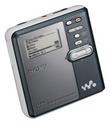 I’ve been an advocate of Sony minidisc recorders for some time. The introduction of the technology in the early-1990s was a digital jump from the compact cassette. Through the early 2000s, I maintained that minidisc was a technology of the present. The recorder has been popular in professional use, such as news recording. The removable minidisc media is rugged, the battery life is great, and sound quality is high. Unfortunately, Sony maintained its proprietary ATRAC format a bit too long, so it was only since 2004 that digital-to-digital transfers from the Hi-MD format have been possible (at least on originally-recorded content, since other transfers were copy-protected).
I’m continuing to use minidisc technology for recording1, but recording and listening to prerecorded content are really two different activities.
A few visits to my favorite used CD stores — Sonic Boom (in Toronto) and Amoeba Records (in Berkeley) — resulted in a stack of over 20 unlistened CDs. Transferring the content would span multiple (probably 4 or 5) minidiscs. Each minidisc, at 4x compression, stores 320 minutes of music. To date, minidisc players are lighter in weight than hard-disk-based audio players (e.g. the original iPod), but carrying multiple minidiscs is inconvenient. With a rumour that hard disk players may become a technology of the past), the direction for MP3 players is flash memory technology. Today’s 4GB to 8GB models — at under $200 — are light, and have the capacity to store music that will play on for days and days.
 The market leader in this segment is the iPod Nano. I went to Best Buy and picked one up. My (second) son Eric recommends iPods because he’s found Apple builds the most durable hardware. However, if you watch Apple’s television advertising, they promote “iPod + iTunes”. Their path is to encourage purchasing content downloaded from their web site.
The way I like to buy my music is by trolling used CD stores. I don’t store music on my computer, and CDs are good media for long term storage. I do download audio, but mostly as free lectures from sites such as itconversations.com. I track feeds with Feedreader. Apple really wants me to use iTunes.
I can adapt pretty well to software, but I’ve found iTunes to be a pain. There’s also a significant issue of lock-in, as content transferred to the device loses its file name, so exporting the music from one player to another player is quite annoying. (I tried a freeware iPod transfer utility, but it crashed, requiring a reset of the iPod). I would have replaced the iPod operating system with Linux, except that works only on hard-disk iPods, not the flash-based Nanos.
Within 24 hours, I had returned the iPod Nano to Best Buy for a refund.
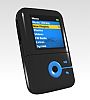 My (third) son, Noah, has been using a Creative Zen V Plus. It’s half of the length of an iPod Nano, but thicker. The sound it produces with MP3 is superior to the Nano. With Windows XP, it has a drag-and-drop file manager, so it’s easy to move content over (and back). I bought a 8GB version of the Creative Zen V Plus at Future Shop.
The “Creative Media Explorer” does “rip audio CDs”, with the annoying choice to convert digital audio into the Windows proprietary WMA format. Creative sells the program to rip directly to MP3, as a download. As an alternative, I’ve been using the freeware version of Media Monkey. This not only helps keep my content organized, but rapidly looks up and tags the album art from Amazon.
 While I was considering whether the Zen would be the best choice, there was another leading contender: the Sandisk Sansa e280. It’s slightly thicker than an iPod Nano, and the thumb wheel is mechanical rather than touch-sensitive. It’s unique in offering an microSD expansion slot. The missing feature that dropped the Sansa from my consideration list was bookmarks: since the lectures I download can be more than an hour long, not having a bookmark could mean a lot of thumb-scrolling to pick up where I left off.
Through all of this searching, I’ve found the anythingbutipod.com web site to be most informative (and entertaining). The primary author over there suggests that you “Think for yourself. Be an individual“. While I really do prefer Apple’s OS/X operating system over Windows XP, the iPod-iTunes lock-up just rubs me the wrong way, philosophically. I don’t pirate either recorded music or software. The fact that I still buy CDs seems to put me in the minority of purchasers, which may mean that the way I use my MP3 player is not the same as the way that others do.
Oh, and for headphones? I prefer foldable over-the-head sport headphones, but JVC HA-FX33 “marshmallow” in-ear headphones have proven to be a cheap alternative when I want more isolation.
1. My days for recording on minidisc may be numbered. Minidiscs record in ATRAC format, which I have been converting to WAV, and then to MP3. Sony is continuing to upgrade its software for transferring content, but the ATRAC-to-WAV conversion will be gone if my laptop becomes a Vista machine. As much as I’m not a fan of Windows XP, this is a motivation for me to not advance my technology.
Correction, 2007/05/26: In the minidisc forums, it’s been explained to me that WAV conversion, as a standalone application will no longer be supported in Vista. However, the WAV conversion feature had previously been moved into the Sonicstage product proper, so I will continue to be able to convert minidisc recordings from .oma to .mp3.
I guess that I will be able to continue to use my minidisc recorder for some years to come!


